Hot summer, large numbers on your SPIKE

Hot summer brings high temperatures. In Europe, we are okay at least with the number of digits, while those using Fahrenheit are now above 100.

Fun aside, many of us wanted to show numbers outside the 0-9 range, and here came Anton displaying numbers between 0-99 on a SPIKE hub. I really loved his approach, and as both the FLL and WRO season is on a bit of a pause, I have time to play around.

In this article, I will show you a method to display numbers on a 5×5 LED display from 0-399, also sharing the Python code that you can copy and use.


Displaying single-digit numbers

Numbers between 0-9 are not really tough as LEGO already came up with a digit set between 0-9 that I simply copied from the LEGO design using the center 3×5 space. Pybricks does have an approach that renders 0-9 chars between 3×5-4×5-5×5 design that I found a bit wacky and hard to read.

Displaying two-digit numbers

Displaying two-digit numbers is not supported by LEGO, yet both Anton and Pybricks came up with a different solution for numbers between 10-99.

While Pybricks used a consistent approach, splitting the display into 2×5 areas with a separating gap and displaying both tens and ones in a new slim number set. This approach is, as mentioned, consistent and brings further advantages.

On the other hand, Anton came up with the idea of splitting the display into 2×5 and 3×5 parts, displaying the tens with a new slim number set dimmed and the ones with the standard 3×5 font in full brightness.

This was a brilliant and inspiring move, as despite the limited display of SPIKE Hub’s 5×5 LED display, we can use different brightness to separate digits.

I loved both approaches and wanted to combine them, yet assumed that for two digits, the tens position is more relevant. Therefore, I preferred to make that brighter and bigger.

Displaying three-digit numbers

The Pybricks idea was inspiring to take the next logical step for numbers between 100-199.

Simply using the first column dimmed gave a simple extension to the Pybricks+Anton mode, splitting 1×5 – 2×5 – 2×5 sections, separating them by brightness in a dim – bright – dim pattern.

The step to extend this to 200-499 is a bit odd, yet my primary motive was to display orientation between 0-360 is not yet fulfilled. What if we use the first digit in a bit of a wacky mode? Instead of using the 1×5 column as a placeholder for “100,” I decided to use a small “1,” displaying as many pixels as there are hundreds.
Respectively: 200 will be denoted by 2 pixels, 300 by 3 pixels, and 400 by 4 pixels. Five hundred would clash with a hundred, which, for the sake of simplicity, I still wanted to keep as straightforward as possible.

Displaying negative numbers

Pybricks had already ingeniously made steps to display -1 to -99 by simply displaying an extra dimmed pixel in the gap area.

Negative one-digit numbers are much more visible when using the original numbers shifted to the right, with a bright negative sign on the left.

Negative two-digit numbers are much more visible using the slim numbers, still condensed, and the ones digit dimmed, with a bright negative sign on the left.

Following up on this concept, we have an easy solution for -100 to -199 by just overlaying the minus sign with the one sign in the hundreds place.

Extending this wacky usage to up to -499 to -199 is quite easy: simply move the minus sign below the number of 100 multipliers. I admit this might not be straightforward, yet it is still useful, so I decided to keep it.

Creating and decoding images using Pybricks

When I started to play with icons, it seemed logical to use the original LEGO approach, creating a two-dimensional array of brightness values between 0-100. This seemed quite excessive, so I quickly moved to a two-dimensional array between 0-10 to make it easier and also experimented with the string-based approach of Anton: “00900:09090:00900:00900:09990” or even “00a00:0a0a0:00a00:00a00:0aaa0” to use the hex to display 10*10=100 brightness.

def display_number(value):
    _PB_DIGITS_5X3 = [
        [0b111,0b101,0b101,0b101,0b111],
        [0b010,0b110,0b010,0b010,0b111],
        [0b111,0b001,0b111,0b100,0b111],
        [0b111,0b001,0b111,0b001,0b111],
        [0b101,0b101,0b111,0b001,0b001],
        [0b111,0b100,0b111,0b001,0b111],
        [0b111,0b100,0b111,0b101,0b111],
        [0b111,0b001,0b010,0b100,0b100],
        [0b111,0b101,0b111,0b101,0b111],
        [0b111,0b101,0b111,0b001,0b111]
    ]
    _PB_DIGITS_5X2 = [
        [0b11,0b11,0b11,0b11,0b11],
        [0b01,0b11,0b01,0b01,0b01],
        [0b11,0b01,0b11,0b10,0b11],
        [0b11,0b01,0b11,0b01,0b11],
        [0b10,0b11,0b11,0b01,0b01],
        [0b11,0b10,0b11,0b01,0b11],
        [0b11,0b10,0b11,0b11,0b11],
        [0b11,0b01,0b01,0b01,0b01],
        [0b11,0b11,0b00,0b11,0b11],
        [0b11,0b11,0b11,0b01,0b11],
    ]
    _PB_MINUS_SIGN = [0b0,0b0,0b111,0b0,0b0]
    _PB_PLUS_SIGN = [0b0,0b010,0b111,0b010,0b0]
    _PB_EXCLAMATION_SIGN = [0b1,0b1,0b1,0b0,0b1]

    def decode(input, brightness, shift):
        return Matrix(
            [
                [
                    (((line>>(4-i-shift))&1)*brightness if 5>i+shift else 0)
                        for i in range(5)
                ] for line in input
            ])
    def decodedigit(digit, is_normal, brightness, shift):
        if is_normal: return decode(_PB_DIGITS_5X3[digit], brightness, shift)
        else: return decode(_PB_DIGITS_5X2[digit], brightness, shift)

However remembered to check the approach from Pybricks, and that is the current preferred approach, simply adding a bit mask constant “0b010,0b110,0b010,0b010,0b111” getting rid of any extra spaces and giving the display function a chance to adding the shift and dim parameters.

Fun and next steps

Combining my hobbies is always fun. This project gave me a fantastic opportunity to work with LEGO, robotics, fonts, and typography, so it gave me an awesome time. Hope this will give some fun and help to some of your next projects as well.

As a next step, I am submitting a feature request to Pybricks to improve the numbering system for all of us. Please feel free to watch or join the discussion as there might be further options to enhance this solution.

Debug mode and Assert node in the web version

Following up on the Experiments with the SPIKE App Debug Mode post David had an excellent question on the web versions of the SPIKE app.

After playing around with the web app I managed to enable the debug mode and as a hidden gem I have found a new debug mode node “Assert”.

Steps to enable the debug mode:

  1. open the web app via https://spike.legoeducation.com or
    https://spike3.legoeducation.com
  2. Open the debug tool in Chrome with F12
  3. Head for application tab
  4. Click and drop down local storage, select the url for the site https://spike3.legoeducation.com)
  5. Check and edit the settings key adding “ui.debug”:{“value”:true},
    • I recommend copying the value, then using notepad for editing and finally pasting the modified value back
  6. Reload the site & Enjoy

Bugfixing a frozen LEGO SPIKE Prime (.llsp) file

Recently a case of freezing / hanging LEGO SPIKE Prime file was shown to me by a coach heading to a competition with her kids the very next day (2.0.5, Win10).

The problem

The file could not be opened and the LEGO Spike App started with and error message. To dig deeper we do need to understand the architecture of the LEGO SPIKE App.

LEGO Software Architects decided a few years back to discontinue the problematic supporting of NI LabView due to most probably performance, stability and scalability issues. Creating a full blown framework in 2018ish would have been quite an expensive decision therefore they have probably looked for an easy to use blocky low-code/no-code alternative.

As nowadays MIT Scratch is essentially a kind of standard and the community already created a solution to replace the quite disturbing WeDo 2.0 application -that is another story- with a WeDo Scratch support, this architecture must have seen tempting here as well.

This stack creates a side-loaded application that handles the hardware connection (WeDo Link), while Scratch itself gets an extension (WeDo Extension) that provides the additional block types.

The Architecture

The LEGO Spike application is using quite a modern architecture of creating a React application that runs as a web application in any browser running the MIT Scratch 3 framework with a SPIKE specific extension on top.
A native side component handles device management such as USB and Bluetooth connectivity.

In fact EV3 and Robot Inventor apps use the very same structure. With an exception that for EV3 a genial pattern-based replacement is created instead of the versatile-but-complex-NI-compilation process.

Packaged web app using a chromium frame running on your machine is quite a popular choice: Microsoft Teams, Slack, Discord, just to name a few. Cross platform compatible, yet sluggish with performance and lacking native features like file or easy shortcut-keyboard access.

Fun fact: while the Spike app is running, just type this into your Chrome (danger! for entertainment purposes only).

http://localhost:1995/?appId=spike&debugUrl=http%3A%2F%2Flocalhost%3A1995%2Fdebug&defaultLanguage=en-US&fullVersion=2.0.6-latest-flipper.106386&sentryEnabled=1&webUrl=http%3A%2F%2Flocalhost%3A1995&wsUrl=ws%3A%2F%2Flocalhost%3A1995

The problem – revisited

Without further ado let us see what the Spike App actually does after opening a Scratch canvas with Spike specific blocks on the palette?

In a separate blog post I have dug deeper into settings and even a hidden debug menu for Spike to show that the log files for the app can be found c:\Users\<username>\AppData\Local\Packages\LEGOEducation.SPIKELEGOEducation_by3p0hsm2jzfy\LocalCache\Roaming\SPIKE\log.txt

Here we can see several log messages, and some usual errors. What is “easy” to see is that here these error lines are duplicated.

#$@!% I hate “usual” errors

Have you noticed the product decision was to remove the problematic “Save file” menu so kids don’t forget to save their work? This was a common problem when the EV3Lab used to crash in its years of instability 2014-2018ish.

At every change the program auto-saves the file that has the following double-zipped format.

Program.llsp is a zip file, containing generic project descriptor, a complete vector screenshot of the program for preview and a standard Scratch 3 file.

The scratch file consists the content project file and any media files (sound files and additional sprites – not applicable in Spike environment).

The key file carrying all data is project.json using JavaScript Object Notation containing a quite flat structure of node-stacks as seen in the editor and some misc data such as variables.

Checking the file closely in my json editor I could see that the content structure was duplicated.

The Solution

From this point it was fairly easy to fix the problem. Deleting the two duplicated nodes and re-zipping the file to scratch.sb3, then re-zipping the upper structure to program.llsp yielded to a pretty stable and working file again.

Happy end as also the kids were able to compete the next day and also win their category. Would have been a shame to let infrastructure ruin the diligent work of young kids.

I will be sharing this bug with the LEGO engineering team as well to have this issue fixed.
If you happen to have contacts, please let them hear our word that we’d like a much more stable and enabling environment as we ❤️ LEGO and kids.

Update: David Lechner and Ravi Sambhara have found this bug and solution already in February, 2022 with EV3 Classroom 1.5.2. Let’s shout out to get this fixed soon!

Update2: I have created a small Lego App Tool kit to fix the problem, until LEGO service team does.

Bugfixing a frozen EV3Lab .ev3 file

Recently a case of freezing / hanging LEGO Mindstorms (EV3Lab) file was shown to me by a coach heading to a competition with her kids the very next day.

The problem

The file would not open and the EV3Lab app on the Windows laptop was just loading-loading-loading without ever opening the project.

What could have happened? How to fix this ugly problem that is endangering kids success?

To dig deeper we must understand that the EV3Lab is built upon the LabView application by National Instruments around / before 2014.
Therefore the application must be a 32 bit app and therefore has a maximum memory allocated by any app of 2GB.

Root cause

Digging deeper into the underlying struture one can find that the .ev3 file is a zip-compressed version of many mainly xml files that are known to typically be quite memory inefficient.

We are not talking about large chunks of memory, as the competition.ev3 file size seems to be 211kB only. However there is one catch. The EV3Lab app runs on SilverLight platform, that was originally invented by Microsoft to replace Java and sandbox the application over the web.

Opening a file in Silverlight, packaged within a windows exe, emulating an interpreted intermediate LabView (vix files) can get quite memory hungry.
Such a program eats up enormous amount of memory.

The solution

Ultimately our problem roots in an out-of-memory situation, that is caused by opening several files at once. Namely 2 programs and 37 myblocks.

Our solution will be to disable the auto-opening of programs.

Within the structure you’d love to look for a Project.lvprojx file.

Within the project file we are looking for blocks of <SourceFileReference/> of .ev3p files. As a next step we are adding a line of instruction to disable auto opening.
I suggest to use a proper xml enabled code editor such as Visual Studio Code.

Original code snippet

<SourceFileReference StoragePath="Program1.ev3p" RelativeStoragePath="Program1.ev3p" OverridingDocumentTypeIdentifier="X3VIDocument" DocumentTypeIdentifier="NationalInstruments.LabVIEW.VI.Modeling.VirtualInstrument" Name="Program1\.ev3p" Bindings="Envoy,DefinitionReference,SourceFileReference,X3VIDocument" />

Modified code snippet

<SourceFileReference StoragePath="Program1.ev3p" RelativeStoragePath="Program1.ev3p" OverridingDocumentTypeIdentifier="X3VIDocument" DocumentTypeIdentifier="NationalInstruments.LabVIEW.VI.Modeling.VirtualInstrument" Name="Program1\.ev3p" Bindings="Envoy,DefinitionReference,SourceFileReference,X3VIDocument">

<X3DocumentSettings ShowFileOnStartup="False" IsTeacherOnlyFile="False" IsHiddenDependency="False" xmlns="http://www.ni.com/X3DocumentSettings.xsd" />

</SourceFileReference>

Closing and re-packing the file into the .ev3 zip structure will do the trick and out file will open in two seconds.

Why are there so many blocks?

Normally kids (longest footnote you can imagine goes here) do not create 30-40-50 programs/myblocks for a competition. It is simply inefficient. They typically copy paste, leave some dead code around.

If we look close enough on the program structure with the help of EV3TreeVisualizier we find that many blocks are duplicated. A key control block is duplicated five times!

Visual diagram of the app using EV3TreeVisualizer
block names are hidden to keep intellectual property of the team

These MyBlock copies are created when kids backup their program by using the builting “Copy-Paste” on any program block that contains myblocks. Automatically the myblock is duplicated and “Program 2” will reference “MyBlock 2” instead of the original “MyBlock1”.

It is very hard to resolve afterwards – either edit the xml file (doing many original backups) or change one-by-one the references in the app.

Avoid the program copy-paste at all costs. Use this method instead.

  1. Select all blocks in the program (Control-A) to copy
  2. Create a new program (Control-N)
  3. Delete the lonely start block
  4. Paste everything (Control-V)

Experiments with the SPIKE App Debug Mode

A few months ago while doing several experiments I did a more thorough analysis of the SPIKE Prime app itself. Generally, I am more than interested in how other developers design software architecture and also have a few hobby projects in mind where knowing the bits and bolts is essential.

This is how I learned about the SPIKE App Debug Mode, which also works in the Robot Inventor App – working with both hubs, the LEGO Mindstorms Robot Inventor (51515) and the SPIKE Prime (45678) hubs.

Quick architecture overview

The applications follow a modern application design pattern: the app itself was coded using React.js framework using JavaScript (TypeScript) and is rendered in a browser, like the one you are reading this post in. The trick is that the app logic itself is packaged into an executable that is downloaded from the respective appstore, like Microsoft AppStore for my Windows laptop. The Electron framework that enables this is also widely used – such as the pandemic superstar Microsoft Teams application or Slack.

For a long time, this HTML5 app as an executable concept had a caveat with functionalities that the browser itself cannot accomplish, such as direct hardware (e.g. USB or Bluetooth) access. There are multiple approaches to circumvent including a precompiled binary such as WebAssembly (wasm). There are new standards for direct browser BLE access, yet last time I have checked LEGO used the Electron callout for binary access to precompiled dotnet dll’s. That is a perfect solution as well.

Enabling the Debug Mode

Warning: we will be tweaking directly with internal files – use it on your own risk as you might change things that would prevent the app from starting.

Head to the Roaming directory of the installed app and open the settings.json file in a text editor. Make sure the app is not running.

  • C:\Users\user\AppData\Local\Packages\LEGOEducation.SPIKELEGOEducation_by3p0hsm2jzfy\LocalCache\Roaming\SPIKE\
  • C:\Users\user\AppData\Local\Packages\TheLEGOGroup.LEGOMINDSTORMSInventor_m36angppq0g76\LocalCache\Roaming\MINDSTORMS_ROBOTINVENTOR\

Change the line or create a new if there is no such line for ui.debug key and set it to true.

Start the app and the chocolate factory of Willy Wonka will open for you, showing up an extra Debug menu with 3 functions and a debug toolbar with 14 functions in the bottom.

The debug functions allow you to look behind what is running on your favourite LEGO platform.

Debug Functions in order of my choice

Menu: Toggle Developer Tools

Opens up the standard Chrome Developer tools, that enables full inspection of the DOM tree, React component explore if extension is installed and debug console.

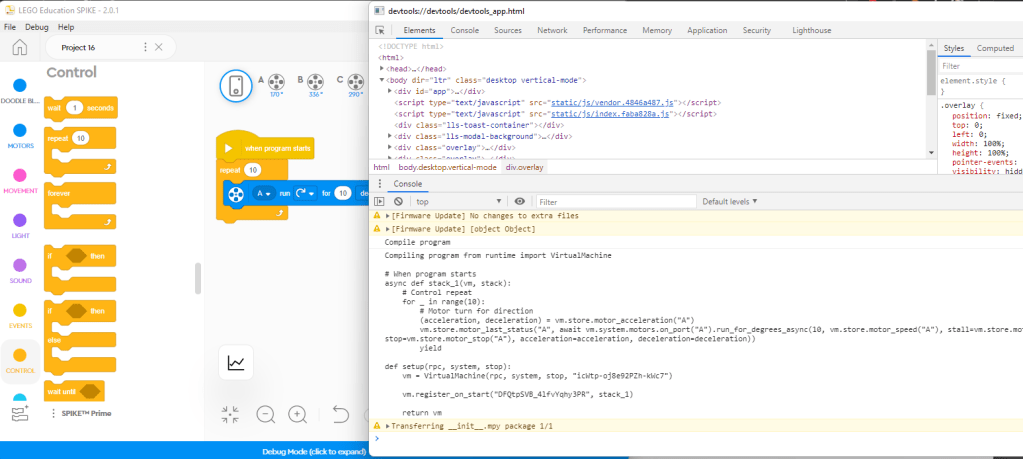
In the debug console, the compiled pyton code is logged once you start downloading the app to the hub.

Footer: Open url in browser

The application itself runs in an Electron container – Mac or Windows executable of a browser without gadgets like an url bar. Still behind there is a web server -probably a node- that makes sure that react app runs smoothly.

I was wondering for a while whether this is really necessary as both the node server and the “frontend” uses the same chrome engine, still for sake of simplicity and development time, I would chose the same approach.

This enables you to open up the app core outside of the Windows/Mac app in a regular web browser, while the app is running and access most of the functionalities. Rather a nice to have, still might be a good starting point later.

Menu: Reload and Menu: Force Reload

Is a neat developer option that has probably less importance as the app in the released state is quite stable. Reloads the app within the Electron container to clean up state.

Footer: Toggle Canvas Background

Toggles the background dot pattern of the app canvas – useful for screenshot purposes.

Footer: Download to SVG

Useful for exporting the SVG graphics directly from the canvas. Can only be used if you open a separate chrome window.

Footer: Dump canvas to clipboard, Dump program XML to clipboard, Export block IDs in toolbox

The app itself uses the MIT Scratch framework, so a developer can access directly the blocks here.

I really appreciate this function as I was experimenting with this awesome toolkit and library in the EV3TreeVisualizer project as well.

Footer: Check for content updates

Content (lessons) check – probably useful if you change the content channel to a non-official one.

Footer: Dismiss all toasts

Probably the developers had quite a lot of issues with stuck notification (toast) messages.

Footer: Change log level

You can check in the developer tools window what actions are performed. In the console the the app regularly adds debug information. You can manually set what level of information you are interested in – Error, Warning or Info.

Footer: Connect with web BLE

Interesting one – could not get it working. Probably a future direction to use the browser bluetooth access instead of the native binary support LEGO had to include.

Footer: Change selected product

Manual switch between SPIKE Prime and SPIKE Essential and all.

Footer: Show doodle blocks

Rather nice one.

Doodle blocks do not generate code, yet are used for lesson tutorials. An awesome way to create your own education content using the doodle blocks for pseudocoding.

Footer: Log line graph data

Opens the line graph ware.

Footer: Mock platform

Lets you change which platform the browser thinks it runs on. Could not find the relevance.

Conclusion

Happy hacking and take care!

Let me know if you find any new options or make good use of this.

LEGO is continuously trying to create new and better ways to code their programmable bricks and with the SPIKE Essential – Prime intercompatibility finally started to move towards the LEGO learning continuum I am waiting for quite a while.

Great job LEGO!

User Experience Design needed

I have reached a point with my pet project where it became clear that my user experience design skills are very limited.

Based on an inspirational talk today I engaged in collecting all functionalities with the hope to collect use cases later on.

Without further ado here is a current collection of functions behind the EV3 Tree Visualizer website.

I have plans, though I feel limited in time, talent and energy. Would need help!

  • Upload or drop & parse file for editor
  • Compile directly to .rbf – possible though using LEGO dlls, though it would violate intellectual property, therefore I will not implement this (at list without LEGO approval)
  • USB/Bluetooth connection with brick to download, upload from browser – chrome USB & BT handling would be needed
  • Decompile 1.04 bytecode version from .rbf (ev3m)
  • Blockly editor + generate program from text – would be easy to accomplish, though blockly mutator knowledge is missing yet
  • Cloud storage – upload, share, download, edit, collaborate to Azure cloud: Share via link, Version history, management
  • EV3G generation stabilized — For my own pet project I cannot consistently generate .ev3 files due to the canvas coordinates for the blocks. Here I would need some help (if LEGO is willing to help). Keeps crashing 😞

http://ev3treevis.azurewebsites.net/

https://ev3treevis.azurewebsites.net/Editor.aspx

LEGO EV3GBasic language as and editor and an experiment

Following up the LEGO Digital Continuum one major gap seems to be the lack of text based programming option. Try my EV3GBasic beta editor here https://ev3treevis.azurewebsites.net/Editor.aspx

== TL;DR ==

A text mode programming environment seems to be an inferior requirement if you are targeting 5-6-8-10-12 year old kids and non-programmers, however as of today more and more 14-16 year kids turn to be expert coders, a power option for programming should be vital.

I have 25 years of experience as a programmer, and based on that I feel that not only speed of coding is a key factor; moreover visual code is a highly error-prone approach.

Try to implement anything complex. Sure, you your algorithmic skills will improve, yet you will iterate a lot due to small errors. This is definitely not the way 2020 coding is done.

You need to create code once, fix errors once. Copy and paste like a charm.

Did you know that for many years Visual Basic was THE most used coding language. Understanding that there ARE many smart people in the world without a computer science degree + there is a high market demand for codes to be written.
Combined: world needs a simple enough, yet powerful programming language.

Though I am aware of the existing awesome EV3Basic project (check it out), this is something different: I am sure that LEGO and NI has created quite a powerful language already, just forgot to add the right tooling.

Hence I have defined the EV3GBasic language to simplify the use of EV3G world 1.

In the last few weeks I managed to create a simple text editor and also add a draft version of autocomplete. Yes, this is far away from anything really useable, yet demonstrates my idea and dream at a certain degree.

This beta mode demo is capable of

  • creating a program or multiple programs at once
  • with syntax highlight using standard colors
  • all EV3G functions can be used, with integrated autocomplete/suggestion [ctrl+space]
  • local variables (a.k.a) data wires can used as well starting with “$” sign (e.g. $datawire1), also indicating dataflow direction out $variable1
  • strings have dedicated single apostrophe notation, e.g. Display.StringGrid 'MINDSTORMS', True, 0, 0, Black, 2.
  • all special identifiers and arrays are recognized and respected – colors, sound play types, break or coast, etc.
  • control statements (WaitFor, Loop, Switch) use parentheses for their contained condition WaitFor(ColorSensor.CompareColor 3, [Red], out $detectedcolor)

Once you are done with coding as of today I can offer

  • create and download a standard .ev3 file
  • copy the current code to clipboard and directly paste to ev3 program
  • copy the current code, even multiple functions and paste them to the ev3 project, wrench icon

What is already working

FIRST LEGO League City Shaper mission is working, all blocks, data wires and the loop is working.

What is missing

  • Parallel sequence (Fork) wires are understood, yet not generated
  • Switches are not reliable – sometimes even the EV3G Mindstorm environment hangs until a restart
  • MyBlocks are not yet generated

EV3GBasic language definition seems to be complete – you can generate am EVGBasic overview of any ev3, ev3m project using the standard viewer at http://ev3treevis.azurewebsites.net with text mode, holding the Shift key for alternative mode.

Happy experimenting, let me know what do you think!

Progress Info: I am stuck with National Instruments code node Bounds to be calculated exactly as NI EV3 expects. Without proper canvas coordinates NI LabView / Silvelight seems to hang. Any help is highly appreciated.

1 Once I have my hands on EV3 Classroom this needs to be extended through.

LEGO Digital Continuum and Learning System

ideas how to establish, grow a digital learning system for bricks in the cloud –

“In 1954 Godtfred Christiansen came up with the idea of a toy system. Godtfred saw the immense potential in Lego bricks to become a system for creative play, but the bricks still had some problems from a technical standpoint: their locking ability was limited and they were not versatile. In 1958, the modern brick design was developed.” (1)

As a software engineer, I believe that in 2019 (almost 2020) LEGO are still lacking the tool for a versatile digital system of education and in the past 6 years, LEGO, FIRST and several kids and educators inspired and challenged me to learn and think about digital education on bricks.

Based on this I believe that LEGO has the potential in 2020 to power self-confidence by creating a digital learning system. My working name for this system here will be LEGO Digital Continuum and Learning System.

Lack of a versatile tool – Problem statement

Many of the current LEGO digital and robotics education tools are limited to a narrow focus; They are tied to a single platform (2) and present a single learning approach as well.

We are all different in age, gender, nationality, experience level, interests and dreams.

For many years I have had exposure to gamification concepts, kudos to Mario Herger, a wonderful and talented former colleague and person from whom I learned that confidence and game mechanics nowadays are consciously designed in a systematic way within all games and gamified systems.

Following your learning curve, the system grows, expands and provides you with more insights, tools, options gradually. In an ideal case, this keeps you in the constant flow [Csikszentmihalyi, Mihaly 1975. Beyond Boredom and Anxiety: Experiencing Flow in Work and Play] with constant engagement and confidence boost.

Teaching robotics within the programs of FIRST LEGO League, FIRST LEGO League Jr, WRO and having exposure to in-house programs such as SAP CodingKids and the wonderful foundation of Skool, Yes She Codes there seems to be a constant struggle seen about the learning curve of any digital education system. Most of the tools are steep at the beginning, yet lack expansion afterwards while one grows. Most problematic of all is that they are heavily heterogeneous, therefore there is an investment to re-learn from the basics many times.

As an example: once you learn how to code WeDo 2.0, it is cumbersome to take that knowledge onward while learning SPIKE or EV3, right? I have heard so many educators, parents and coaches claim, that they are not capable to understand the insights of a robotics platform as this is too complex for them, but no worries – kids will be able to learn them fro sure.

Really? If we, adults, coaches, parents, teachers are not confident enough to jumpstart – how can we expect the young ones to do so.

Digital System – Solution proposal

I believe that Godtfred did with phisical bricks what needs to be done here at the digital bricks.

Have you noticed that no adults are afraid or reluctant to put together LEGO bricks, right?
It is obvious everyone can do that.

So shall be digital learning. We would need a versatile digital education system to learn, play and bring kids from kindergarden to highschool level.

Let me tell you about my dream.

My initial ideas, requirements

Very fast and easy learning curve. Easy to switch on, easy to on board. Everyone can use in 5 minutes. No install needed, can be used from the web-browser.
How to realize: Create an awesome web HTML5 based application.

EV3Blockly Junior – concept view

Present a very limited initial toolbox and user interface (similar to Scratch Jr)
How to realize: e.g. pick ONE parameter for each EV3 block and default on all other parameters. Conditional statements shall be easy to understand – no content is to be hidden behind tabs, or complex structures. Therefore only IF-THEN is realized, no else or switch-case complexity.
Working name: EV3 Blockly Jr

Easily expands as experience level grows.
How to realize: Expand with optional parameters, capabilities. Create a stackable system of using iconic parameters, still clearly separating blocks from parameters. The parameter system must be consistent for each hardware stack with any visual programming language (VPL).

Examples are:

  • Ranges for steering: -4 .. 0=straight .. +4
  • Numeric parameter types such as rotation, degrees, seconds
  • Colors <red,black,white…>
  • IRproximity <veryclose-close-mid-far-reallyfar>
  • IRremote <button1, button 2, button 3, button 4, button 9>
Advanced port selector

Easily expands as inventory grows.

  • Similarly to the WeDo 2.0 – long pressing on a sensor/motor icon adds optional port selection, not displayed initially.
  • This enables more advanced users/ones with more accessory to use all the 4 or 6 or whatever ports when in need.

Switch to more advanced visual representation / visual programming language as experience grows.

Switching between visual representations, VPLs should happen easily, with a press of a button even from complex to simple whenever conversion is possible. A very good example is Microsoft MakeCode.

  1. EV3 Blockly Junior is a starter environment to kickstart 4-8 year old into robotics.
  2. EV3 Blockly Junior advanced (stackable parameters, port selection, conditional statement)
  3. EV3 Blockly a visual representation of EV3G language, full compatibilty.
  4. LEGO EV3 Programming (iPad, Win10 tool). Limited EV3G language environment for EV3 for tablet mode.
    pro: tablet mode
    con: Data wires and myblocks are painfully missing.
  5. LEGO Mindstorms EV3 (current tool from NI on Windows 7/8/10 and for not upgraded Macs)
    pro: huge variety of EV3 functionality, good modularity with myblocks, local variables are present in the form of data wires
    con: inferior performance: slow, hard to have an overview, some very advanced mode sensor functions missing
    , lack of fast coding due to graphical language
  6. EV3 Mindstorms Basic (text language, compatible with EV3G)
  7. EV3 Mindstorms Python (text language, compatible with EV3G)
  8. Micro Python code using ev3dev and Micropython (ev3dev+LEGO)
    pro: highly advanced functionality
    con: steep learning curve, hard to get a jumpstart for many

Cloud enabled Multi-user immerse experience

  • Code can be exported/imported either on local drive or can be stored in the cloud hosted by LEGO
  • Personal accounts storing personal projects
  • Projects can be private, restricted or public
  • Users can invite other users for collaborating on a specific project – User – project relation can be either owner or collaborator.
  • Collaborative editing of projects must happen simultaneously – similarly to prezi.com or office365.com or google docs – seeing the other user(s) focus, all changes visible instantly, with chat window
Image result for google document collaborative user editing"

Anonymous access, start coding without registration

Version control from the starting point, immediately

  • Program versions must be visible over time – username, date, optional comment for changes
  • Named versions, checkpoints
  • Difference between any two versions must be easily visible
  • To b evaluated: Branching, merging

Conclusion

In my dreams, there is a tool that is available for all students, educators, wannabe programmers, kids moving towards more complex programs such as FTC and finally all interested grannies.

Thanks for reading through my initial ideas about this dream. Could you somehow join, contribute, drive, connect and finally – who knows what we could achieve?

Could you help us bring this idea to LEGO Education? Do you have any ideas you would share, add or even contradict with?

I would be glad to hear your point! Sharing is caring, ideas are best when shared. We all work, compete, seek different challenges yet goals sometimes are quite similar and we do not know the answers but are keen to learn, collaborate and share.

You can comment here below or visit the facebook site of EV3 TreeVisualizer and leave your comment and ideas there.

Gracious professionalism as Woodie Flowers phrased this.

Footnotes

(1) https://en.wikipedia.org/wiki/Lego
(2) I am aware of the new tool of created by LEGO for EV3, currently only available for Mac. Looking at the source code of the app it seems to be compatible both with EV3 and SPIKE, still lacking the ability to create data wires/local variables for EV3.

LEGO Digital Continuum and Learning System examples

Here you will find some preliminary examples for LEGO Digital Continuum and Learning System demonstrated on the FLL City Shaper Crane mission code with slight variations based on the level of the tool.

Original code provided by FIRST LEGO League

CityShaper_CraneMission x 
Ă@lîîl 
E:Ôj

EV3Blockly Junior in EV3 Tree Visualizer not yet created/parts in progress

2.25 
0.25 
0.25

Stackable parameters of different types, paramets and possibilities gradulally expanding.

EV3Blockly in EV3 Tree Visualizer EV3TreeVisualizer, http://ev3treevis.azurewebsites.net/

CityShaper_CraneMission 
StartBlock 
Move Rotabons Ports 
O LmpConfion Tine How_Lmg 
While 
Math 
Move 
Move 
Subtract X 
Unlimited Ports 
Stop Ports 
o 
Result 
Steering 
Brake At End 
Brake 
Brake At End 
AW17 
dNw18 • 
speed o 
Brake At End 
MedumMotw Degrees MotorPort 
Brake At End 
Brake 
o 
¯ Timer How_Long 
MedumMotw Time MotorPort 
Brake At End 
Brake 
Move Rotabons Ports 
Brake At End 
Brake 
Brake 
Brake

EV3 Programming App for iPad/Win10

` ! X
1 
225 
7 
1`鬱 
X 
1 
7 
㉭ 
가

EV3 Mindstorms App LEGO on NI LabView (EV3G)

Machine generated alternative text:
CityShaper_CraneMissionx

EV3 Basic Code semi-existing, text generated by EV3TreeVisualizer

EV3 Python Code not yet existing

Further tools, not in direct scope of this post

Microsoft MakeCode

0

LEGO SPIKE PRIME preliminary

SPIKE PRIME code from LEGO Education

LEGO BOOST, Vernie solving the Crane challenge

Unfortunately LEGO announced that BOOST app will be removed from Win10 from 2020. Wondering what happens with the tablet version.

Still Vernie is able to solve the crane mission 😀

Design a site like this with WordPress.com
Get started